请问这个boa的coupon可以套上PayPal?
另外没有找到2%的offer,过期了?

Link是这个,不知道是不是targeted。你可以试试直接ebay.com输入BOFA5看看行不行?
https://www.ebay.com/start/shop?rmvSB=true&mkcid=1&mkrid=711-53200-19255-0&siteid=0&campid=5339066905&customid=&toolid=10001&mkevt=1
确实找不到了。你可以试试其他的cashback portal。我用paypal是因为我有paypal那个3%信用卡,就都用paypal了。
1 个赞
多谢介绍,server part deal看着不错,翻新盘都是通电时间多久的?
现在nas用4个wd eastystore拆出来的18T,通电时间快4年了,速度也有点慢,考虑要不要换下来
一律按照从出厂一直通电处理,所以建议买X20,X22这种出场没几年的,X18都有点老了
1 个赞
固件更新:
一般来说如果没遇到问题不需要甚至不建议更新固件。更新固件有可能会让硬盘变砖,所以做好备份。
Seagate
希捷的硬盘一般在 Seagate Technology - Download Finder 可以下载到,输入硬盘的序列号就可以了。
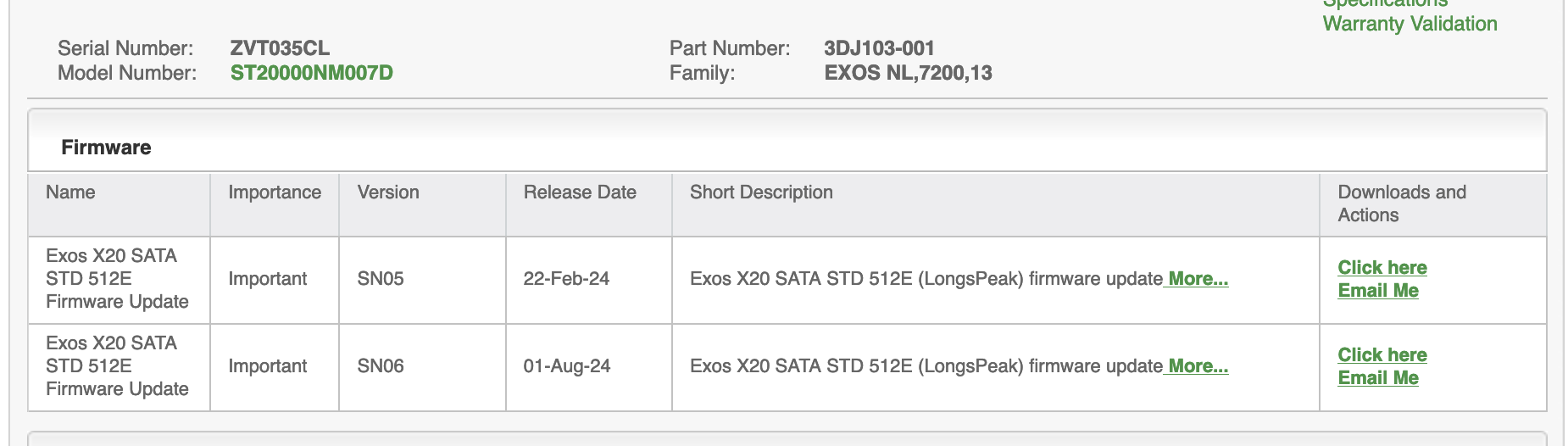
下载完后解压会有 firmware 和 command line tools 两个文件夹,cli tools里面有Windows和Linux的SeaChest工具,简单用法如下:
./SeaChest_Firmware_x86_64-alpine-linux-musl_static --scan # 找到设备名称
./SeaChest_Firmware_x86_64-alpine-linux-musl_static -d /dev/sgX --downloadFW ~/firmware/firmware_file_name.LOD # 刷写固件,可以同时刷多块同型号的硬盘
WD
shuck出来的硬盘没有固件可以下载,内置硬盘固件需要联系客服获取:
Toshiba
They will tell you to pound sand if you are not a business customer 
Alternative for WD and Toshiba drives
https://files.hddguru.com/download/Firmware%20updates/
这里有硬盘论坛用户上传的固件,风险自负,型号新一点的硬盘一般固件都有数字签名,一般不会被篡改(?)
1 个赞
从一年两度老问题, Dell Credit 到底买什么,大家来集思广益继续讨论:
Dell也卖硬盘,目前主要是WD Gold,去年的DP是可以price match
gold
Dell不能price match westerndigital.com 
无语。官网不行
SMART attributes
S.M.A.R.T. 是硬盘自我监测的一套系统。
在Linux下可以安装smartmontools来查看硬盘的SMART信息:
smartctl -x /dev/sdX # Prints all SMART and non-SMART information about the device.
smartctl -A /dev/sdX # Prints SMART attributes
smartctl -A的输出如下(希捷Exos X20):
=== START OF READ SMART DATA SECTION ===
SMART Attributes Data Structure revision number: 10
Vendor Specific SMART Attributes with Thresholds:
ID# ATTRIBUTE_NAME          FLAG     VALUE WORST THRESH TYPE      UPDATED  WHEN_FAILED RAW_VALUE
  1 Raw_Read_Error_Rate     0x000f   080   064   044    Pre-fail  Always       -       91126929
  3 Spin_Up_Time            0x0003   092   091   000    Pre-fail  Always       -       0
  4 Start_Stop_Count        0x0032   100   100   020    Old_age   Always       -       58
  5 Reallocated_Sector_Ct   0x0033   100   100   010    Pre-fail  Always       -       0
  7 Seek_Error_Rate         0x000f   076   060   045    Pre-fail  Always       -       38893926
  9 Power_On_Hours          0x0032   094   094   000    Old_age   Always       -       5918
 10 Spin_Retry_Count        0x0013   100   100   097    Pre-fail  Always       -       0
 12 Power_Cycle_Count       0x0032   100   100   020    Old_age   Always       -       55
 18 Unknown_Attribute       0x000b   100   100   050    Pre-fail  Always       -       0
187 Reported_Uncorrect      0x0032   100   100   000    Old_age   Always       -       0
188 Command_Timeout         0x0032   100   100   000    Old_age   Always       -       0
190 Airflow_Temperature_Cel 0x0022   071   045   000    Old_age   Always       -       29 (Min/Max 19/37)
192 Power-Off_Retract_Count 0x0032   100   100   000    Old_age   Always       -       53
193 Load_Cycle_Count        0x0032   100   100   000    Old_age   Always       -       1577
194 Temperature_Celsius     0x0022   029   055   000    Old_age   Always       -       29 (0 18 0 0 0)
197 Current_Pending_Sector  0x0012   100   100   000    Old_age   Always       -       0
198 Offline_Uncorrectable   0x0010   100   100   000    Old_age   Offline      -       0
199 UDMA_CRC_Error_Count    0x003e   200   200   000    Old_age   Always       -       0
200 Multi_Zone_Error_Rate   0x0023   100   100   001    Pre-fail  Always       -       0
240 Head_Flying_Hours       0x0000   100   100   000    Old_age   Offline      -       5632 (234 243 0)
241 Total_LBAs_Written      0x0000   100   253   000    Old_age   Offline      -       40327678131
242 Total_LBAs_Read         0x0000   100   253   000    Old_age   Offline      -       1536609730
其中重点关注attributes 5, 187, 188, 197, 198
希捷的Raw_Read_Error_Rate, Seek_Error_Rate一眼看上去会很吓人,但其实是一个48位的十六进制值,最大16位表示错误数,后面32位表示通总读取或者寻道的次数,比如这里的SMART attribute 1 16进制表示下是0000 056E 7C91,也就是在91126929 (56E7C91) 次读取操作中没有出现错误。
还有一种方法是对比value和threshold,value高于threshold一般就没事。
希捷计算器:https://s.i.wtf
如果 attributes 187, 197, 198 值不是0的话赶快备份数据,硬盘随时可能会挂。
Attribute 188据Backblaze说是与硬盘故障高度相关,但是我有几块硬盘(希捷)raw值非常高,可能YMMV。
希捷硬盘某些情况下load cycle count会很高,可能是硬盘省电设置的原因,不断启停,最好用SeaChest把EPC和PowerBalace禁用掉。
WD硬盘:
=== START OF READ SMART DATA SECTION ===
SMART Attributes Data Structure revision number: 16
Vendor Specific SMART Attributes with Thresholds:
ID# ATTRIBUTE_NAME          FLAG     VALUE WORST THRESH TYPE      UPDATED  WHEN_FAILED RAW_VALUE
  1 Raw_Read_Error_Rate     0x000b   100   100   001    Pre-fail  Always       -       0
  2 Throughput_Performance  0x0004   133   133   054    Old_age   Offline      -       108
  3 Spin_Up_Time            0x0007   084   084   001    Pre-fail  Always       -       311 (Average 330)
  4 Start_Stop_Count        0x0012   099   099   000    Old_age   Always       -       474
  5 Reallocated_Sector_Ct   0x0033   100   100   001    Pre-fail  Always       -       0
  7 Seek_Error_Rate         0x000a   100   100   001    Old_age   Always       -       0
  8 Seek_Time_Performance   0x0004   140   140   020    Old_age   Offline      -       15
  9 Power_On_Hours          0x0012   099   099   000    Old_age   Always       -       11339
 10 Spin_Retry_Count        0x0012   100   100   001    Old_age   Always       -       0
 12 Power_Cycle_Count       0x0032   094   094   000    Old_age   Always       -       471
 22 Unknown_Attribute       0x0023   100   100   025    Pre-fail  Always       -       100
192 Power-Off_Retract_Count 0x0032   100   100   000    Old_age   Always       -       1136
193 Load_Cycle_Count        0x0012   100   100   000    Old_age   Always       -       1136
194 Temperature_Celsius     0x0002   045   045   000    Old_age   Always       -       36 (Min/Max 17/61)
196 Reallocated_Event_Count 0x0032   100   100   000    Old_age   Always       -       0
197 Current_Pending_Sector  0x0022   100   100   000    Old_age   Always       -       0
198 Offline_Uncorrectable   0x0008   100   100   000    Old_age   Offline      -       0
199 UDMA_CRC_Error_Count    0x000a   100   100   000    Old_age   Always       -       0
Attributes 1, 5, 7, 196, 197, 198 raw非0可能硬盘马上会挂。氦气盘如果attribute 22 (helium level) raw值低于100说明漏气了,赶快备份数据,否则读写速度会变得非常慢,然后挂掉。
如果attribute 199 raw值高于0说明你的SATA线或者背板有问题。
References:
2 个赞
除了主贴中型号外,Exos X22, X24 (or IronWolf Pro ST24000NT002), WD HC580 (or Gold 24TB), HC590, Toshiba MG10, MG11 似乎都没什么毛病,当然这些新型号基本没有公开的real world可靠性数据。
个人觉得双磁臂硬盘长期可靠性存疑
2 个赞
请问大手子们知不知道像server part deals这种商家的打折促销规律? 近期还会不会有好的deal出现了? 比如之前的Exos X24 16TB 140USD这种?
希捷20T 230,但是不太清楚拆开之后里面是啥
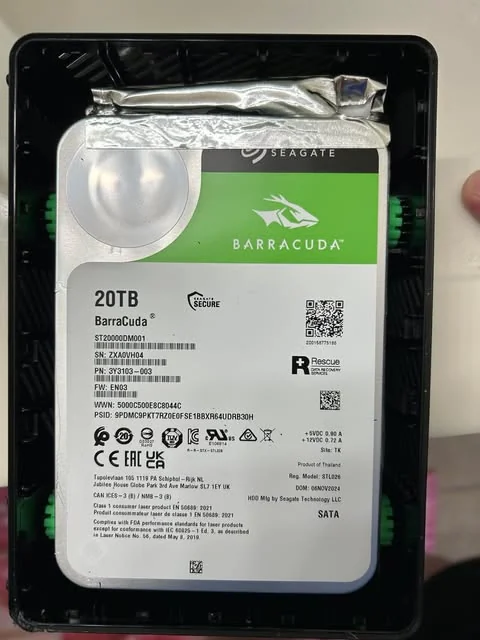
回顾了一下这个楼,才发现跟楼主在2023年有过一模一样的对话,只不过当时说的是18T 200块钱的easystore
都是酷鱼吗?
Laser device那肯定是HAMR了,之前seagate官网的199.99 16T据说还是exos
希捷也有ST16000DM001 
请问这个拆开来用做日常NAS应该没什么问题吧?HAMR肯定不是SMR了吧?
应该没什么问题,但是注意保修。HAMR可以是CMR或SMR,这块盘是CMR
1 个赞