不知道有多少人爬长楼的时候是会挑高赞看的,论坛在展示回应的时候,如果只有点赞没有别的回应会显示在右边,如果有别的回应就会显示在左边,很annoying,也容易漏看只有点赞的(如下图)
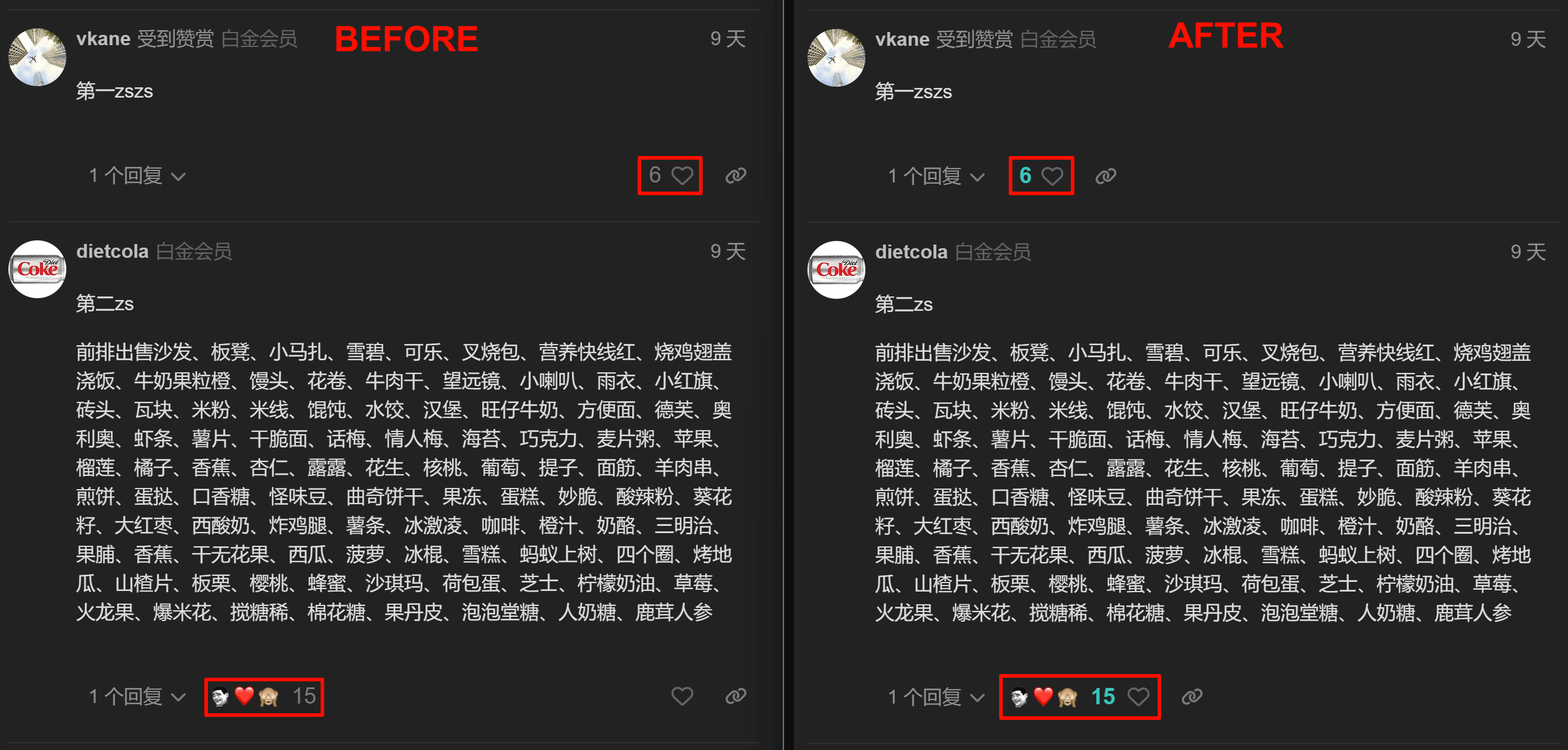
所以这个脚本统一把回应栏挪到了左边,并且用初音绿蓝高亮了回应的数字,这下回应数量一目了然了,挑高赞看再也不用斗鸡眼了 
需要安装脚本管理器如 Tampermonkey/Violentmonkey,脚本托管在 Greasy Fork:脚本链接,就两行 CSS
disclaimer: 纯后端,CSS白痴 
不知道有多少人爬长楼的时候是会挑高赞看的,论坛在展示回应的时候,如果只有点赞没有别的回应会显示在右边,如果有别的回应就会显示在左边,很annoying,也容易漏看只有点赞的(如下图)
所以这个脚本统一把回应栏挪到了左边,并且用初音绿蓝高亮了回应的数字,这下回应数量一目了然了,挑高赞看再也不用斗鸡眼了
需要安装脚本管理器如 Tampermonkey/Violentmonkey,脚本托管在 Greasy Fork:脚本链接,就两行 CSS
disclaimer: 纯后端,CSS白痴
前排占座  火钳刘明
火钳刘明
强力留名
給张歆艺同学点赞
为什么只能时间轴排序不能点赞排序呢
discourse有这个选项啊
曾经吧。。我怎么记得。。就在左边?
至少应该 比如高于10赞高亮,低于的话就灰色?
全变色…意义不大
有没有优先显示赞和回应数量高的回复的脚步
因为这些楼层是懒加载,会一段一段根据你浏览的楼层来加载后面的楼层
简单的前端不太够,需要先获得所有楼层信息,然后再根据你喜好排序,无疑响应时间会长很多
我一开始是这么实现的,依次判断每个回复的点赞量然后改style,结果没考虑到懒加载 往后划的都没生效
要支持懒加载就得轮询或者监听列表长度变化,轮询太dirty了,监听列表长度变化as backend我得自己琢磨琢磨
考虑到多少点赞才高亮的这个阈值其实蛮重口难调的,我就直接改了顶层CSS静态高亮,自己用下来其实已经蛮够用的了,当然这个可以加到todo list里 
系统默认10赞就给个徽章
或者可以在顶端设个参数,想调整自己改默认值
感觉很偏颇啊。其实往往高赞的都是没有什么营养的。反而是说实在话的没人反应。
但几百甚至上千帖的高楼要一条条看下来臣妾实在做不到啊 
这就需要父老乡亲们多多给干货点赞了 比如我这条
一般那个也不需要看,或者看看楼主就可以了 
先点赞了再说
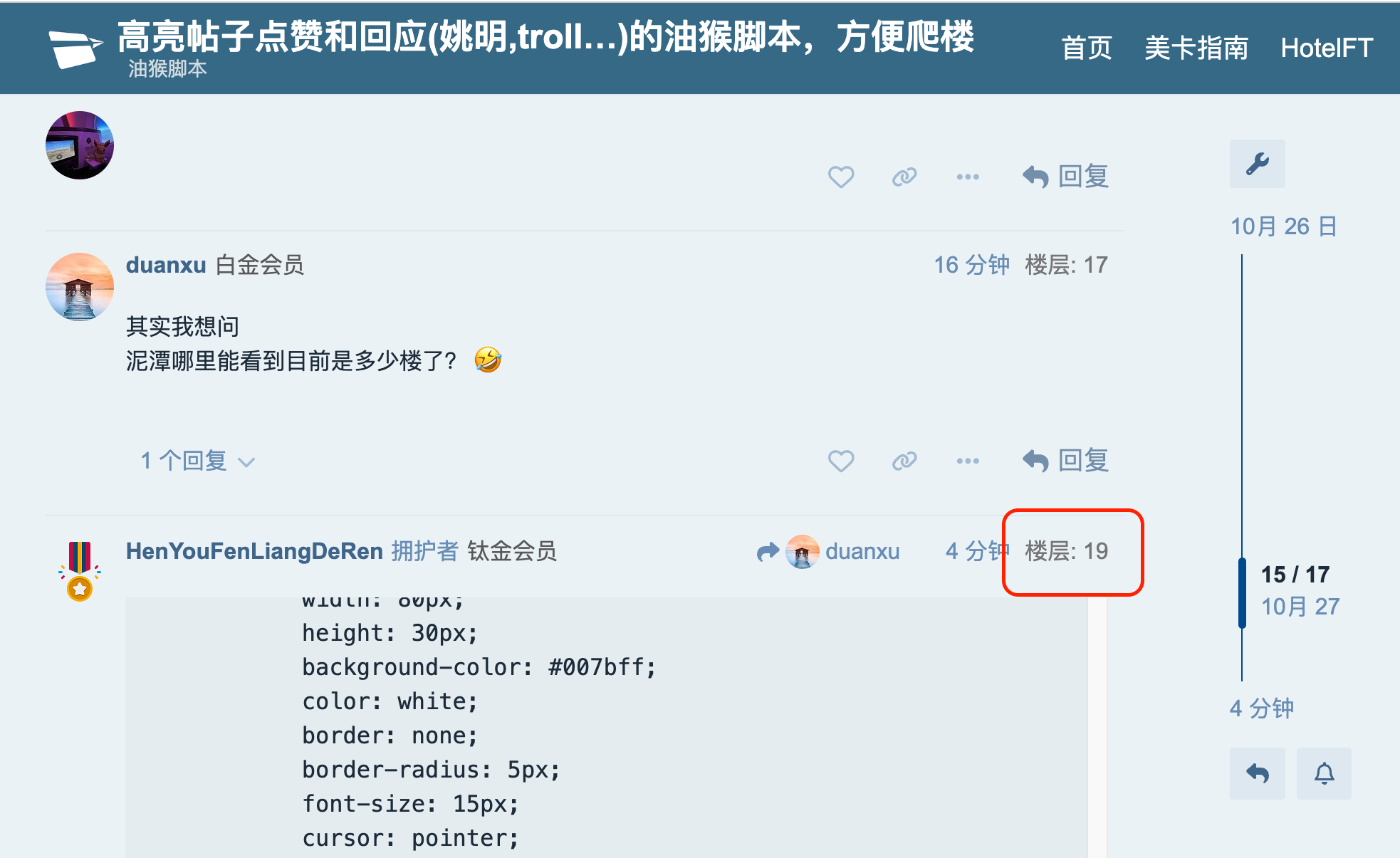
其实我想问
泥潭哪里能看到目前是多少楼了? 
(function () {
    'use strict';

    // 为所有帖子添加楼层号,改进以避免重复添加
    function addFloorNumbers() {
        document.querySelectorAll('.boxed.onscreen-post').forEach(function (post) {
            if (!post.querySelector('.floor-number')) { // 检查是否已经添加了楼层号
                var floorNumber = document.createElement('div');
                floorNumber.className = 'floor-number';
                floorNumber.textContent = '楼层: ' + post.id.split("_")[1];
                floorNumber.style.cssText = 'color: grey; margin-left: 10px;';
                post.querySelector('.topic-meta-data').appendChild(floorNumber);
            }
        });
    }

    // 简化MutationObserver初始化
    function initMutationObserver() {
        var observer = new MutationObserver(function () {
            addFloorNumbers(); // 只需在DOM变化时尝试添加楼层号
        });

        observer.observe(document.body, { childList: true, subtree: true });
    }

    // 简化随机跳转逻辑
    function randomJump() {
        fetch(window.location.href + '.json')
            .then(response => response.json())
            .then(data => {

                if (data && data.posts_count) {
                    const postId = 1 + Math.floor(Math.random() * data.posts_count);
                    const currentUrl = new URL(window.location.href);
                    const list1 = currentUrl.pathname.split("/");
                    if (list1[list1.length - 2] == "topic") { list1.push(postId); }else if (list1[list1.length - 3] == "topic") { list1[list1.length - 1] = postId; };
                    const newUrl = list1.join("/");
                    window.location.href = newUrl;
                    alert('恭喜楼层【' + postId + '】的用户被抽中!');
                }
            })
            .catch(error => console.error('Error:', error));
    }

    // 页面URL变化监测和按钮状态更新
    function monitorURLChangeAndUpdateButton() {
        let lastURL = location.href;
        setInterval(() => {
            const currentURL = location.href;
            if (currentURL !== lastURL) {
                lastURL = currentURL;
                updateButtonVisibility();
            }
        }, 1000); // 每秒检查一次URL变化
    }

    // 更新随机楼层按钮显示状态
    function updateButtonVisibility() {
        const isTopicPage = /^https:\/\/uscardforum\.do\/t\/topic\//.test(location.href);
        const randomButton = document.getElementById('randomButton1');
        randomButton.style.display = isTopicPage ? 'block' : 'none';
    }

    // 初始化
    function init() {
        const randomButton = document.createElement('button');
        randomButton.id = "randomButton1";
        randomButton.textContent = '随机楼层';
        randomButton.style.cssText = `
            position: fixed;
            bottom: 90%;
            right: 10px;
            width: 80px;
            height: 30px;
            background-color: #007bff;
            color: white;
            border: none;
            border-radius: 5px;
            font-size: 15px;
            cursor: pointer;
            z-index: 9999;
            display: block; // 默认不显示
        `;
        randomButton.onclick = randomJump;
        document.body.appendChild(randomButton);

        addFloorNumbers(); // 初始时添加楼层号
        initMutationObserver(); // 监听DOM变化
        monitorURLChangeAndUpdateButton(); // 监听URL变化并更新按钮显示状态
    }

    window.addEventListener('load', init);
})();
会显示所有楼层数,包括删楼的数
这看的我一脸傻眼,前端白痴。 
这是要放在油猴里面自己开吗?
学习了,现在混泥潭还得会Web才行了,门槛真 高