美签经常被 check 的朋友想必很熟悉 https://www.checkee.info (一个报 check DP 的网站) 
最近在纠结要不要回国签证,看到不少讨论说十月政府关门导致 check 时间大幅上涨,但 checkee.info 自带的分析不太容易看 week-over-week, month-over-month 的趋势,遂简单 vibe 了几个 script 扒拉下数据画了点图。
本帖使用的一些 definition/assumption:
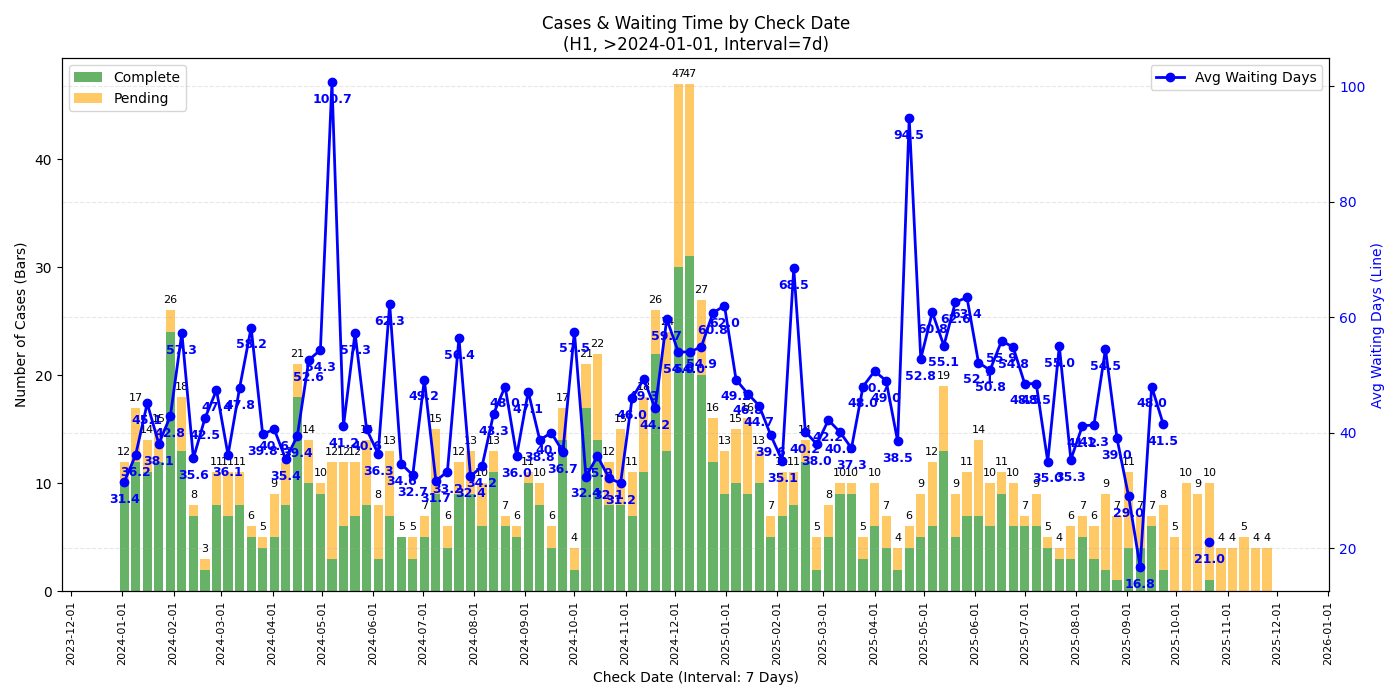
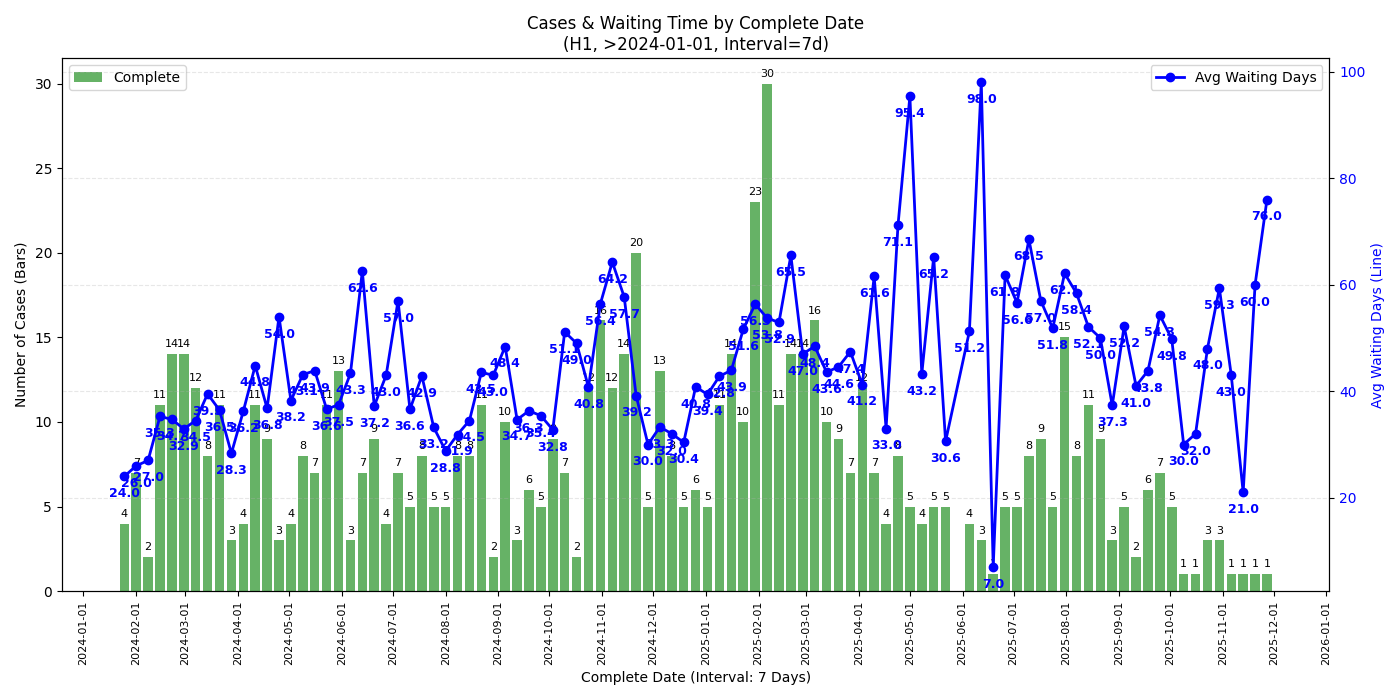
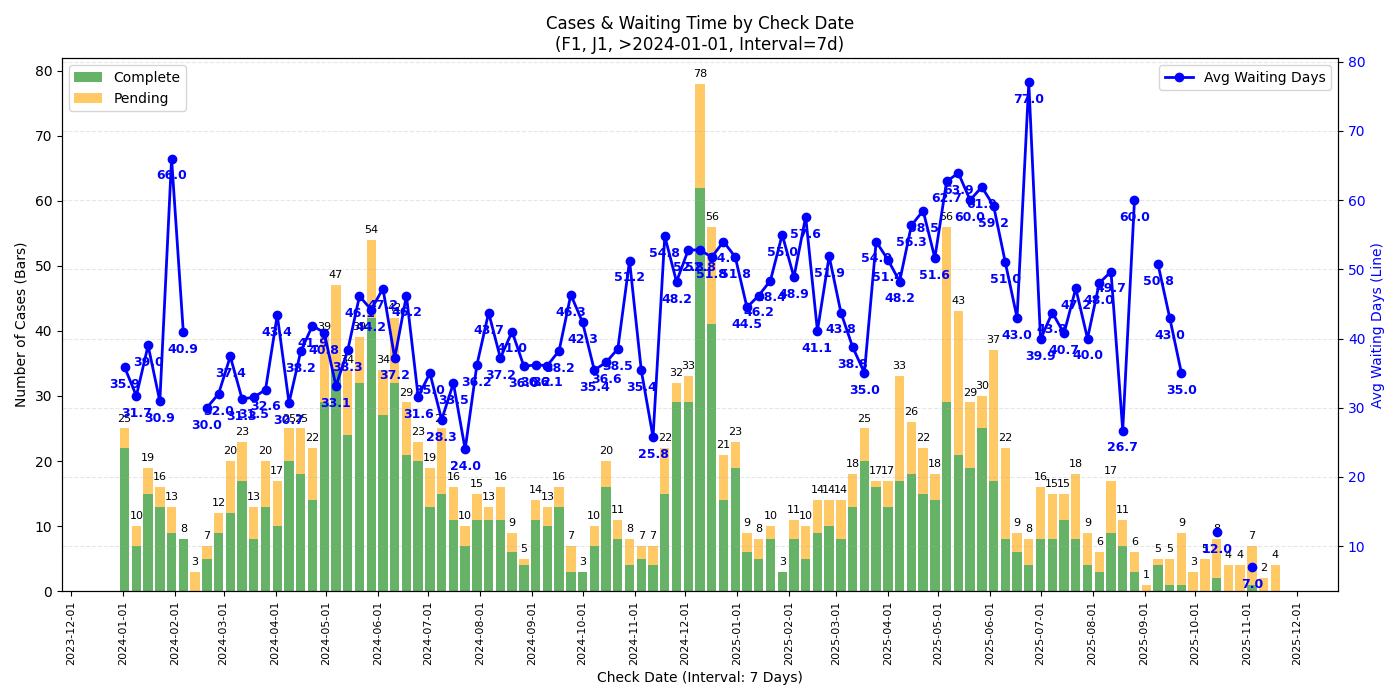
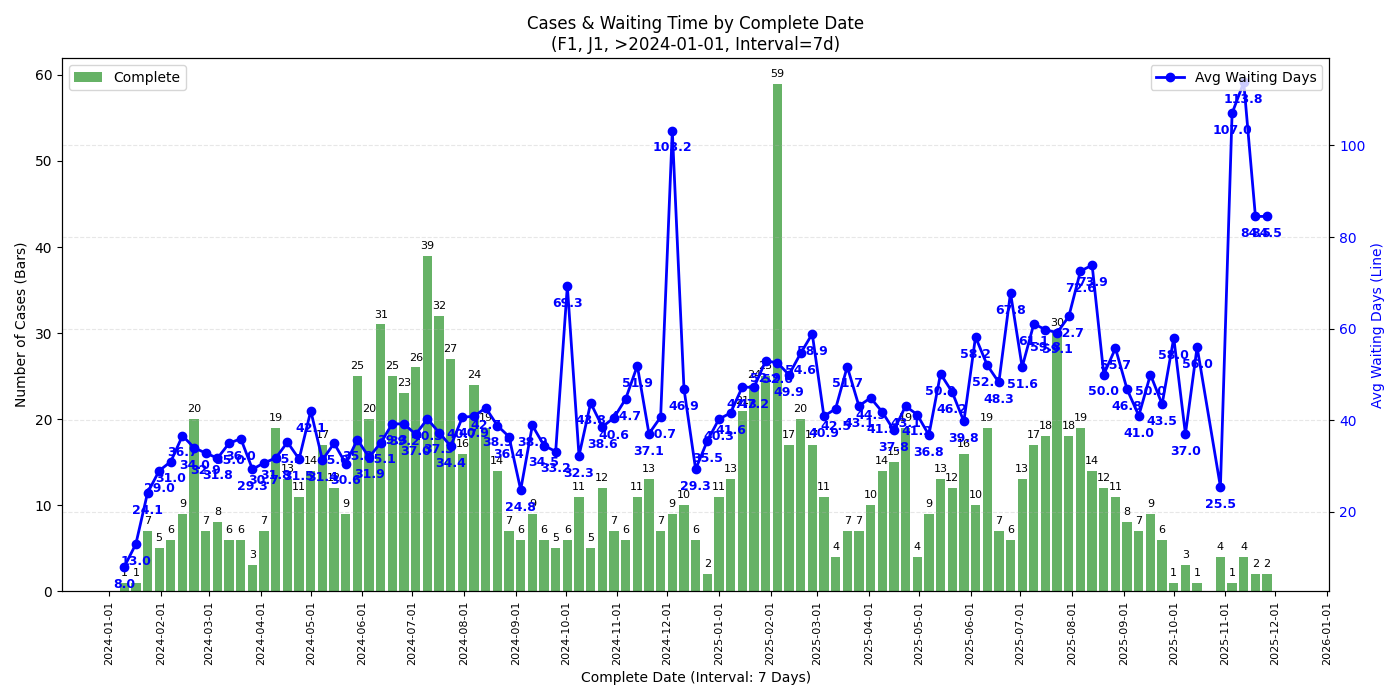
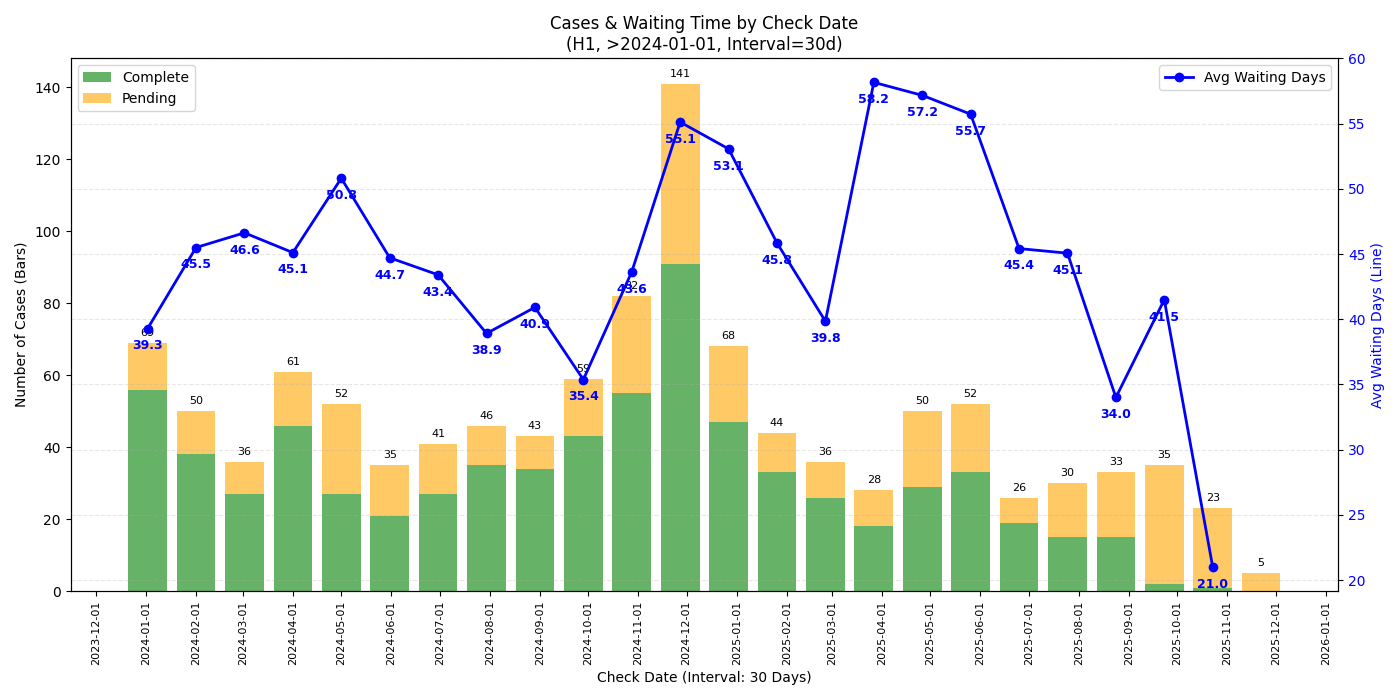
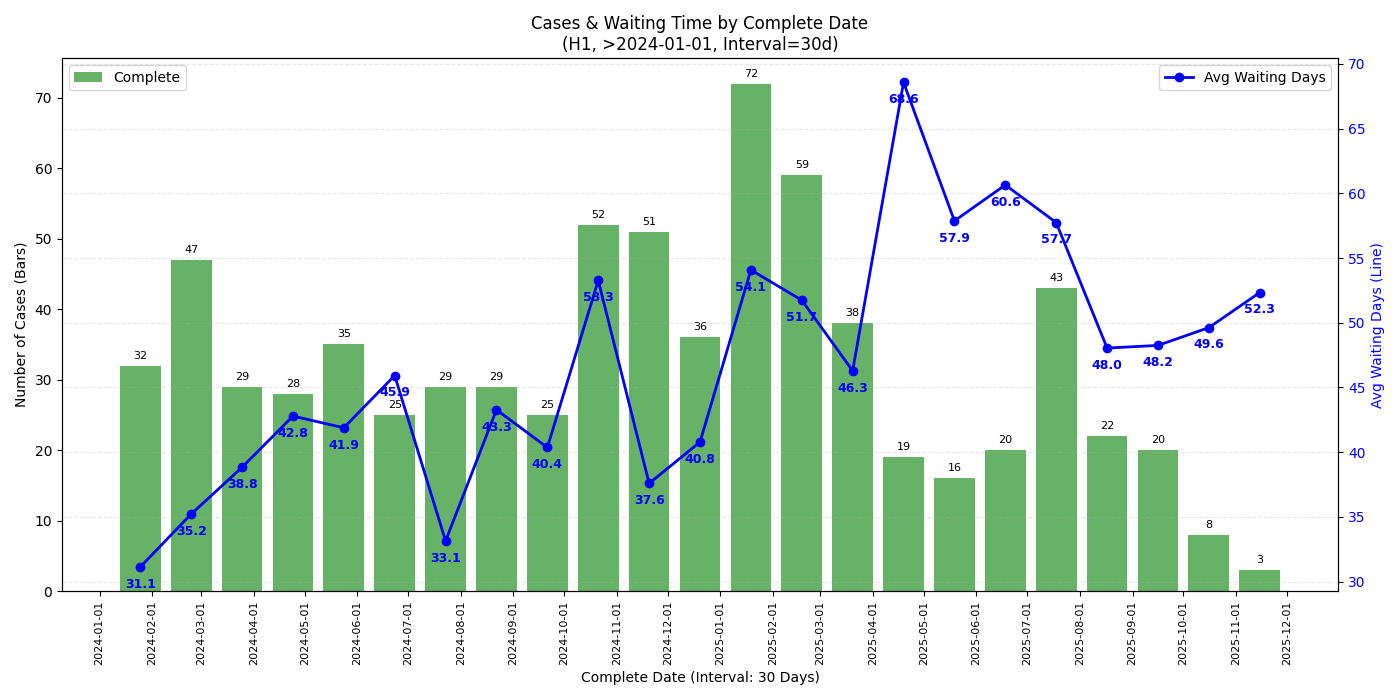
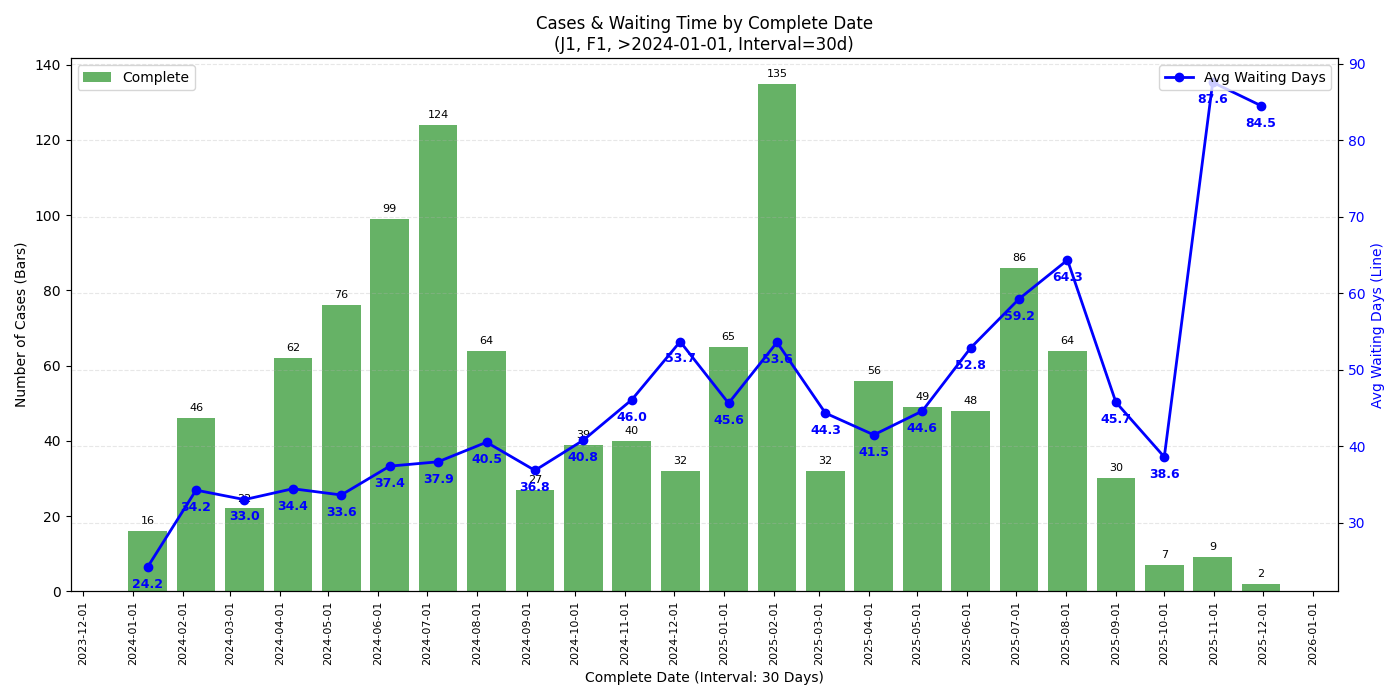
- Check date 是指面签时间,Complete date 是指 check 完成的时间,Waiting time 指两者的 diff(都同 checkee.info 的定义),还在 pending 的 case 没有 complete date 故不体现在 waiting time 的折线图里
- 舍弃 check 时长(waiting time)小于 7d 的数据,个人猜测大都是直接 approve 后正常的处理时间
- x 轴是 complete date 的图都只考虑 completed case 不考虑 pending case
- 数据范围是 2024-01-01 到 2025-12-02,数据更新至 2025-12-02
- 在此范围内一共有 3800 条数据,其中 H1 约 1100 条,F1/J1 加起来约 1800 条
- 并非所有人都会把自己的 DP 贴到这个网站上,因此以下的分析只能代表 checkee.info 网站上的 DP。本站也有 H1B 面签的 DP 帖 开一个新政后H1B面签的dp楼
7 天趋势 (week-over-week)
所有签证类型
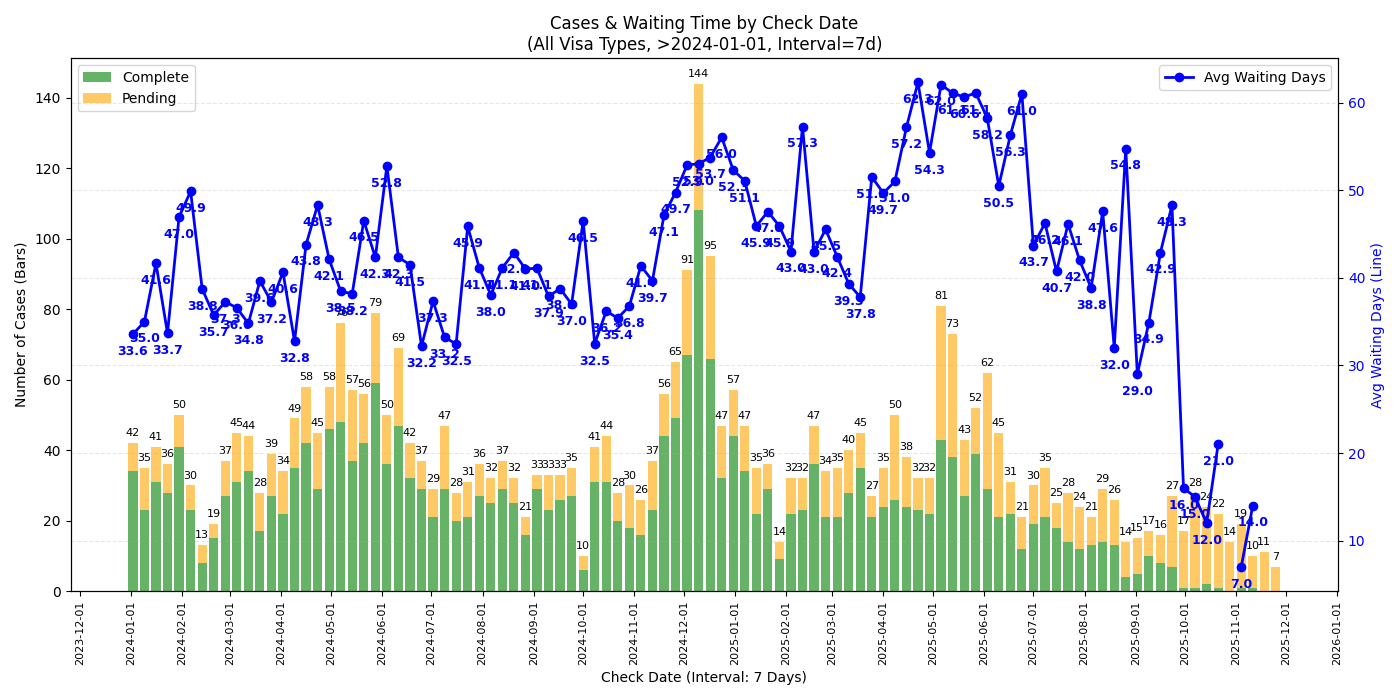
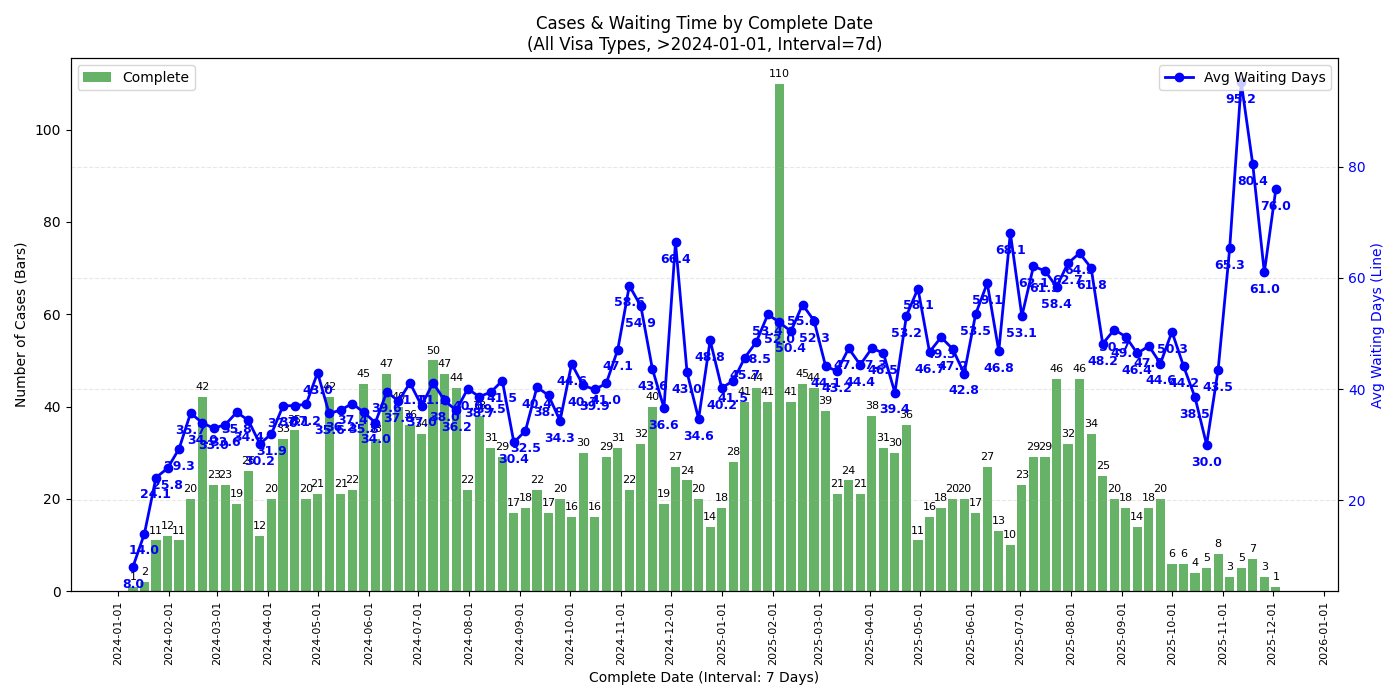
H1
F1 & J1
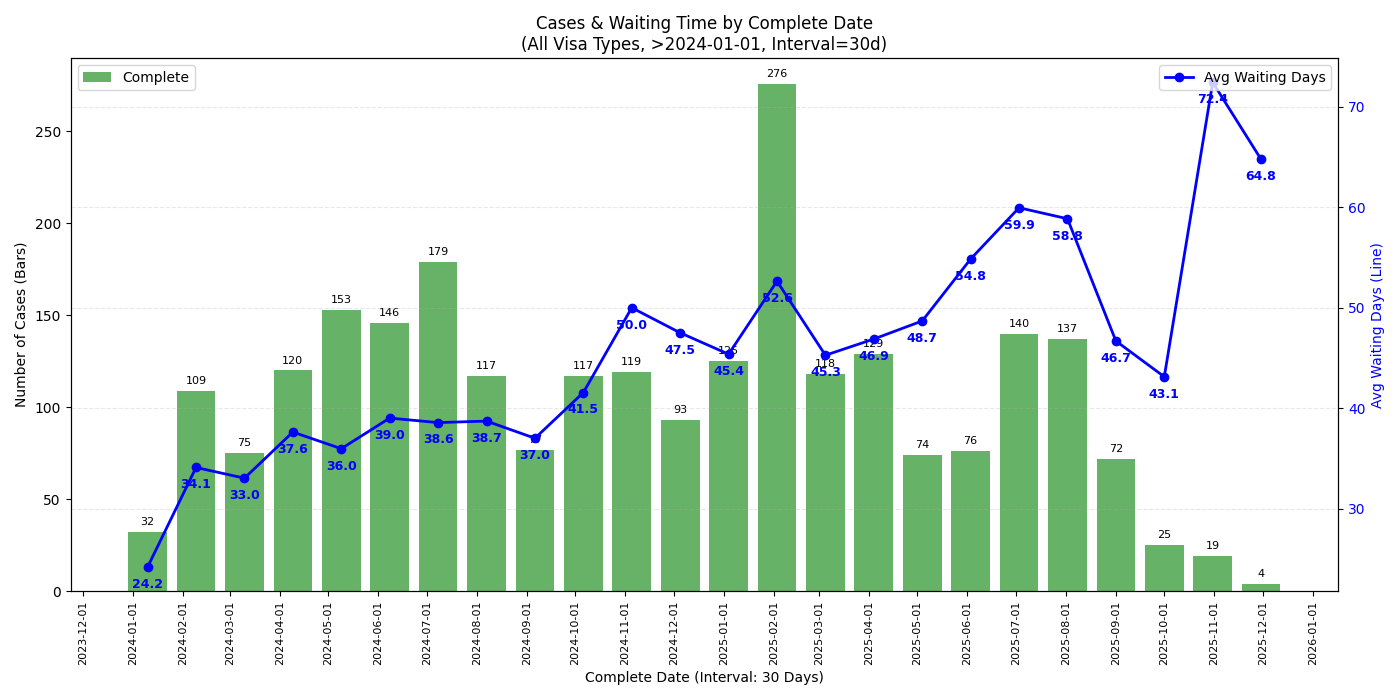
30 天趋势 (month-over-month)
所有签证类型

H1
F1 & J1
个人观察
- 观察近期趋势的话单独某个签证类型的数据量太小,可能看所有签证类型的比较有意义
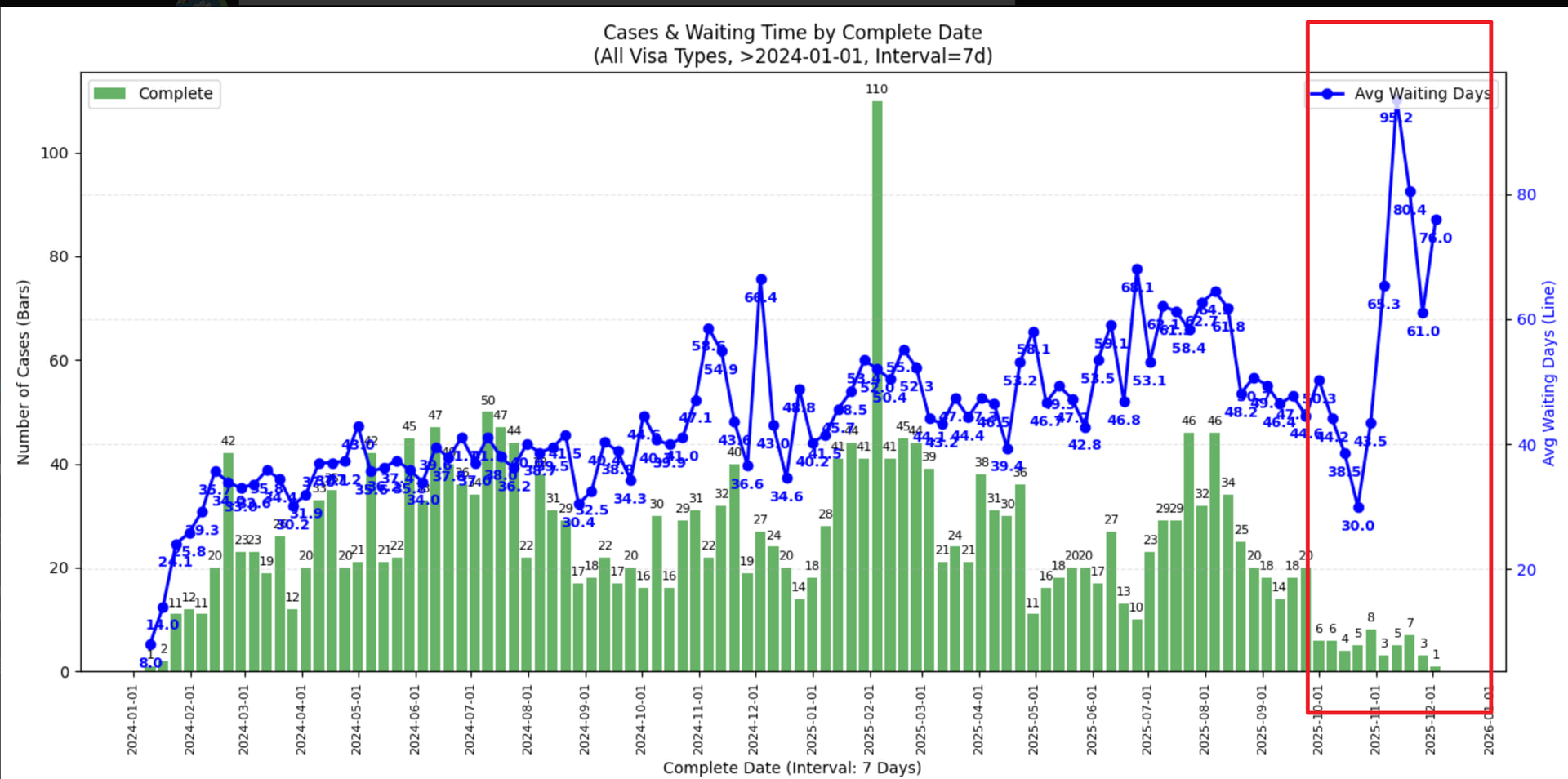
- 从 complete date 的图来看,最近 check 完成的 case (2025/11 中旬以后) check 时长确实有一个不小的上升,似乎有下降趋势但不知接下来的圣诞假期是否会再度上涨
- 从 check date 的图来看 2025/09 的 case 并没有见到太过异常的等待时间,可能跟还有不少 pending case 有关
- 若是年底回去签证建议留足时间 (还是祝福潭友能秒过),不知道一月底可能的二次关门是否会再度影响
Appendix
本帖思路就是把 case details (e.g. Check Reporter) 爬下来放到 csv 文件里,做一下 filter 并 plot 出来。爬的脚本和数据不确定是否有版权或隐私问题就不贴了,让 LLM vibe 一个应该花不了几分钟,留给读者作为练习 。用于 visualize 的脚本贴在此处供参考,如果潭友还需要画别的图又懒得自己扒数据欢迎评论我尽量画一画
visualize.py
import pandas as pd
import matplotlib.pyplot as plt
import matplotlib.dates as mdates
import seaborn as sns
import numpy as np
import os
import re

# --- Configuration ---
# Visa Groups to analyze
VISA_GROUPS_TO_ANALYZE = [
    {'H1'},          # Only H1
    {'F1', 'J1'},
    'ALL'            # All visa types
]

OUTPUT_DIR = 'plots'
MIN_WAITING_DAYS = 7        # Filter out complete cases with fewer than this many days
START_DATE = '2024-01-01'   # Discard records with dates before this
END_DATE = '2026-01-01'     # Discard records with dates after this
INTERVAL_DAYS = 30           # Grouping interval in days (e.g., 7 for weekly, 30 for monthly)

def load_and_clean_data(filepath):
    """
    Loads data from Excel (.xlsx) or CSV.
    Prioritizes Excel reading based on user instruction.
    """
    if not os.path.exists(filepath):
        print(f"Error: File '{filepath}' not found.")
        return None

    df = None

    try:
        # Check extension to decide loader, but default to Excel if ambiguous or xlsx
        if filepath.endswith('.xlsx'):
            print(f"Attempting to read '{filepath}' as Excel file...")
            df = pd.read_excel(filepath, engine='openpyxl')
        else:
            # Fallback for CSV
            print(f"Attempting to read '{filepath}' as CSV...")
            for encoding in ['utf-8', 'gb18030', 'latin1']:
                try:
                    df = pd.read_csv(filepath, encoding=encoding)
                    break
                except:
                    continue
    except Exception as e:
        print(f"Error loading file: {e}")
        return None

    if df is None:
        print("Failed to load data into DataFrame.")
        return None

    # --- Data Cleaning ---
    df.columns = df.columns.str.strip()

    required_cols = ['Check Date', 'Complete Date', 'Visa Type']
    missing_cols = [c for c in required_cols if c not in df.columns]
    if missing_cols:
        print(f"Error: Missing required columns: {missing_cols}")
        return None

    df['Check Date'] = df['Check Date'].astype(str).str.strip()
    df['Complete Date'] = df['Complete Date'].astype(str).str.strip()

    # Determine Status
    df['Case Status'] = 'Complete'
    df.loc[df['Complete Date'].str.contains('0000-00-00', na=False), 'Case Status'] = 'Pending'

    # Parse Dates
    df['Check Date Obj'] = pd.to_datetime(df['Check Date'], errors='coerce')
    df['Complete Date Obj'] = pd.to_datetime(df['Complete Date'], errors='coerce')

    # Drop invalid check dates
    df = df.dropna(subset=['Check Date Obj'])

    # --- 1. Date Filtering (Start & End Date) ---
    # Discard if Check Date OR Complete Date is outside the [START_DATE, END_DATE] range
    start_dt = pd.to_datetime(START_DATE)
    end_dt = pd.to_datetime(END_DATE)

    # Condition: Check Date must be within range
    check_date_valid = (df['Check Date Obj'] >= start_dt) & (df['Check Date Obj'] <= end_dt)

    # Condition: If complete, Complete Date must be within range
    # (Pending cases have NaT/invalid Complete Date, so we ignore them in this specific check)
    complete_date_valid = (df['Complete Date Obj'] >= start_dt) & (df['Complete Date Obj'] <= end_dt)

    # Logic: Keep if (Valid Check Date) AND (If Complete -> Valid Complete Date)
    # Keep = (Check in Range) AND (Status==Pending OR Complete in Range)
    final_date_mask = check_date_valid & ((df['Case Status'] == 'Pending') | complete_date_valid)

    before_len = len(df)
    df = df[final_date_mask].copy()
    dropped_dates = before_len - len(df)
    if dropped_dates > 0:
        print(f"Dropped {dropped_dates} records outside date range {START_DATE} to {END_DATE}.")

    # Calculate Waiting Days (Complete cases only)
    df['Waiting Days'] = (df['Complete Date Obj'] - df['Check Date Obj']).dt.days

    # Filter out negative waiting days
    df.loc[(df['Case Status'] == 'Complete') & (df['Waiting Days'] < 0), 'Waiting Days'] = np.nan

    # --- 2. Filter Short Waits ---
    short_wait_mask = (df['Case Status'] == 'Complete') & (df['Waiting Days'] < MIN_WAITING_DAYS)
    dropped_short_waits = short_wait_mask.sum()

    if dropped_short_waits > 0:
        print(f"Dropped {dropped_short_waits} complete cases with waiting days < {MIN_WAITING_DAYS}.")
        df = df[~short_wait_mask]

    return df

def sanitize_filename(name):
    s = str(name).strip().replace(' ', '_').replace(',', '_')
    return re.sub(r'(?u)[^-\w.]', '', s)

def plot_combined_graph(df, date_col_name, group_name, visa_label):
    """
    Generates a combined dual-axis graph:
    - Bar (Left Axis): Count of Pending vs Complete cases
    - Line (Right Axis): Average Waiting Days
    Groups by INTERVAL_DAYS.
    """
    # Create a local copy to manipulate index
    temp_df = df.copy()

    # Drop NaT in the grouping column so resampling works
    temp_df = temp_df.dropna(subset=[date_col_name])

    if temp_df.empty:
        return

    # Set index to date column for resampling
    temp_df.set_index(date_col_name, inplace=True)

    # Define Resampler
    grouper = temp_df.groupby([pd.Grouper(freq=f'{INTERVAL_DAYS}D'), 'Case Status'])

    # Aggregation
    # We want count of rows for bar, and mean of waiting days for line
    agg_df = grouper.agg(
        Count=('Visa Type', 'size'),
        AvgWait=('Waiting Days', 'mean')
    ).unstack(fill_value=0) # Unstack 'Case Status' to columns

    # agg_df structure: MultiIndex columns: (Count, Complete), (Count, Pending), (AvgWait, Complete), ...

    # Flatten columns for easier access
    # e.g. Count_Complete, Count_Pending, AvgWait_Complete
    agg_df.columns = ['_'.join(col).strip() for col in agg_df.columns.values]

    # Ensure columns exist even if 0
    for col in ['Count_Complete', 'Count_Pending', 'AvgWait_Complete']:
        if col not in agg_df.columns:
            agg_df[col] = 0

    # If grouping by Complete Date, 'Pending' doesn't technically exist on that timeline
    # (since they have no complete date). So Count_Pending will likely be 0 or irrelevant.
    if 'Complete' in group_name:
        bars_to_plot = ['Count_Complete']
        bar_colors = ['green']
        bar_labels = ['Complete']
    else:
        bars_to_plot = ['Count_Complete', 'Count_Pending']
        bar_colors = ['green', 'orange']
        bar_labels = ['Complete', 'Pending']

    # --- Plotting ---
    fig, ax1 = plt.subplots(figsize=(14, 7))

    # Plot Bars (Case Counts) on Left Axis
    # Align='center', width needs to be slightly less than interval to show gaps
    width_days = max(1, INTERVAL_DAYS * 0.8)

    # Pandas plot handles dates on x-axis well
    ax1.bar(agg_df.index, agg_df[bars_to_plot[0]], width=width_days, label=bar_labels[0], color=bar_colors[0], alpha=0.6)

    if len(bars_to_plot) > 1:
        # Stack the second bar
        ax1.bar(agg_df.index, agg_df[bars_to_plot[1]], width=width_days, bottom=agg_df[bars_to_plot[0]],
                label=bar_labels[1], color=bar_colors[1], alpha=0.6)

    # Bar Annotations (Counts)
    # Calculate totals for top-of-bar annotation
    totals = agg_df[bars_to_plot].sum(axis=1)
    for date, total in totals.items():
        if total > 0:
            ax1.annotate(f'{int(total)}',
                         (date, total),
                         xytext=(0, 5), textcoords='offset points',
                         ha='center', fontsize=8, color='black')

    ax1.set_xlabel(f'{group_name} (Interval: {INTERVAL_DAYS} Days)')
    ax1.set_ylabel('Number of Cases (Bars)', color='black')
    ax1.tick_params(axis='y', labelcolor='black')
    ax1.legend(loc='upper left')

    # Plot Line (Wait Time) on Right Axis
    ax2 = ax1.twinx()

    # Filter out 0 wait times (which happen if no completed cases in that bin) for cleaner line
    line_data = agg_df['AvgWait_Complete'].replace(0, np.nan)

    ax2.plot(agg_df.index, line_data, color='blue', marker='o', linewidth=2, label='Avg Waiting Days')

    # Line Annotations
    for date, val in line_data.items():
        if pd.notna(val):
            ax2.annotate(f'{val:.1f}',
                         (date, val),
                         xytext=(0, -15), textcoords='offset points',
                         ha='center', fontsize=9, color='blue', weight='bold')

    ax2.set_ylabel('Avg Waiting Days (Line)', color='blue')
    ax2.tick_params(axis='y', labelcolor='blue')
    ax2.legend(loc='upper right')

    plt.title(f'Cases & Waiting Time by {group_name}\n({visa_label}, >{START_DATE}, Interval={INTERVAL_DAYS}d)')

    # Format X-Axis Date
    ax1.xaxis.set_major_formatter(mdates.DateFormatter('%Y-%m-%d'))

    # Logic to maximize label density without overlapping too much
    # For the default 6-year range, MonthLocator(interval=1) gives ~72 labels which fits nicely with 90deg rotation
    # We use a safety check for very long ranges
    data_span_days = (agg_df.index.max() - agg_df.index.min()).days
    if data_span_days < 3000: # Approx 8 years
        ax1.xaxis.set_major_locator(mdates.MonthLocator(interval=1))
    else:
        # Fallback for extremely long periods
        ax1.xaxis.set_major_locator(mdates.YearLocator())

    # Rotate 90 degrees to fit dense labels
    plt.setp(ax1.xaxis.get_majorticklabels(), rotation=90, ha='center', fontsize=8)

    plt.grid(True, linestyle='--', alpha=0.3)
    plt.tight_layout()

    # Save
    safe_label = sanitize_filename(visa_label)
    safe_group = sanitize_filename(group_name)
    filename = f"combined_{safe_label}_{safe_group}_{INTERVAL_DAYS}d.png"
    filepath = os.path.join(OUTPUT_DIR, filename)

    plt.savefig(filepath)
    plt.close()
    print(f"  Saved plot: {filepath}")

def filter_data_by_visa(df, visa_group):
    if visa_group == 'ALL' or visa_group is None:
        return df, "All Visa Types"

    df['Visa Type Clean'] = df['Visa Type'].astype(str).str.strip()
    mask = df['Visa Type Clean'].isin(visa_group)
    filtered_df = df[mask].copy()
    label = ", ".join(visa_group)
    return filtered_df, label

def main():
    file_path = 'checkee_data.xlsx'

    if not os.path.exists(OUTPUT_DIR):
        os.makedirs(OUTPUT_DIR)
        print(f"Created output directory: {OUTPUT_DIR}")

    print(f"Looking for file: {file_path}")
    df = load_and_clean_data(file_path)

    if df is None:
        fallback_path = 'checkee_data.xlsx - Sheet1.csv'
        if os.path.exists(fallback_path) and not os.path.exists(file_path):
             print(f"XLSX not found, trying fallback CSV: {fallback_path}")
             df = load_and_clean_data(fallback_path)

    if df is None:
        return

    print(f"Total valid records loaded: {len(df)}")
    print("-" * 30)

    for group in VISA_GROUPS_TO_ANALYZE:
        current_df, label = filter_data_by_visa(df, group)

        print(f"Processing Group: {label} (Records: {len(current_df)})")

        if len(current_df) == 0:
            print(f"  No data for {label}, skipping.")
            continue

        # 1. Combined Graph by Check Date
        plot_combined_graph(current_df, 'Check Date Obj', 'Check Date', label)

        # 2. Combined Graph by Complete Date
        plot_combined_graph(current_df, 'Complete Date Obj', 'Complete Date', label)

        print("-" * 30)

if __name__ == "__main__":
    main()```