- 用你的大号在游戏控制台里运行
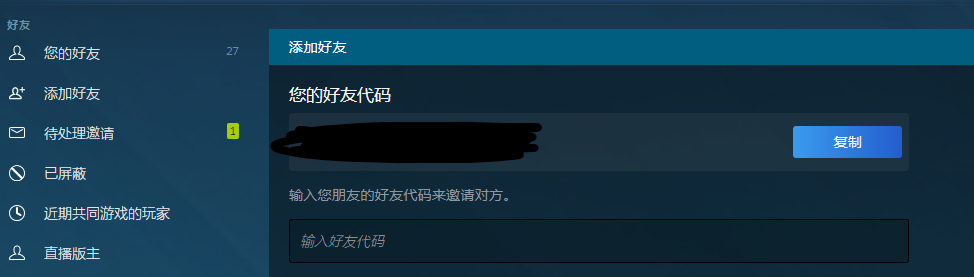
host_writeconfig - 找到你的steam好友代码
- 找到你的steam云存档文件夹
可能是在"H:\Program Files (x86)\Steam\userdata\<好友代码>\730\remote" - 找到你的CS文件夹
可能是在Y:\SteamLibrary\steamapps\common\Counter-Strike Global Offensive\ - 将以下这个脚本保存为
dump_cs_config.ps1
param(
    [Parameter(Mandatory=$true)]
    [string]$ConvarVcfgPath,

    [Parameter(Mandatory=$true)]
    [string]$KeysVcfgPath,

    [Parameter(Mandatory=$true)]
    [string]$OutputCfgPath
)

# 确保输出目录存在
$outputDir = Split-Path $OutputCfgPath -Parent
if (-not (Test-Path $outputDir)) {
    Write-Host "Output directory does not exist. Creating: $outputDir"
    New-Item -ItemType Directory -Path $outputDir | Out-Null
}

$outputLines = @()
$outputLines += "// 从 CS2 VCFG 文件自动生成的配置"
$outputLines += "// 生成于 $(Get-Date)"
$outputLines += ""

# 解析 VCFG 文件特定部分的函数
function Get-VcfgSection {
    param(
        [string]$Path,
        [string]$SectionName,
        [string]$Type # "bind" 或 "convar"
    )

    if (-not (Test-Path $Path)) {
        Write-Warning "File not found: $Path"
        return
    }

    # 使用 UTF8 编码读取文件以保留特殊字符(如示例中的名称)
    $content = Get-Content -Path $Path -Encoding UTF8

    $inTargetSection = $false
    $braceLevel = 0
    $results = @()

    foreach ($line in $content) {
        $trimmed = $line.Trim()

        # 检查段落起始位置
        if ($trimmed -match "^`"$SectionName`"") {
            $inTargetSection = $true
            continue
        }

        if ($inTargetSection) {
            # 追踪大括号以判断段落何时结束
            if ($trimmed -eq "{") {
                $braceLevel++
                continue
            }
            if ($trimmed -eq "}") {
                $braceLevel--
                if ($braceLevel -le 0) {
                    $inTargetSection = $false
                    break # 段落处理完毕,退出循环
                }
                continue
            }

            # 用于匹配的正则表达式:"key" "value"
            # 捕获引号内的内容
            if ($trimmed -match '^"(.+?)"\s+"(.+?)"$') {
                $key = $matches[1]
                $val = $matches[2]

                if ($Type -eq "bind") {
                    # 格式:bind "key" "value"
                    # 我们在按键名周围添加引号,以安全处理像 `\` 或空格这类按键
                    $results += "bind `"$key`" `"$val`""
                }
                elseif ($Type -eq "convar") {
                    # 格式:convar "value"
                    $results += "$key `"$val`""
                }
            }
        }
    }
    return $results
}

# 1. 处理绑定 (Bindings)
Write-Host "Reading Bindings from: $KeysVcfgPath"
$outputLines += "// --- 绑定 (Bindings) ---"
$binds = Get-VcfgSection -Path $KeysVcfgPath -SectionName "bindings" -Type "bind"
$outputLines += $binds
$outputLines += ""

# 2. 处理控制台变量 (Convars)
Write-Host "Reading Convars from: $ConvarVcfgPath"
$outputLines += "// --- 控制台变量 (Convars) ---"
$convars = Get-VcfgSection -Path $ConvarVcfgPath -SectionName "convars" -Type "convar"
$outputLines += $convars

# 3. 写入输出
Write-Host "Writing config to: $OutputCfgPath"
$outputLines | Set-Content -Path $OutputCfgPath -Encoding UTF8

Write-Host "Done! Converted $($binds.Count) binds and $($convars.Count) convars."
- 在控制台中运行
.\dump_cs_config.ps1 "<steam云存档文件夹>\cs2_user_convars.vcfg" "<steam云存档文件夹>\cs2_user_keys.vcfg" "CS文件夹\game\csgo\cfg\dump.cfg"
类似
.\dump_cs_config.ps1 "H:\Program Files (x86)\Steam\userdata\114514\730\remote\cs2_user_convars.vcfg" "C:\Program Files (x86)\Steam\userdata\114514\730\remote\cs2_user_keys.vcfg" "D:\SteamLibrary\steamapps\common\Counter-Strike Global Offensive\game\csgo\cfg\dump.cfg" - 回到游戏,运行
exec dump
你的绑键,准星等都会进入这个cfg
感谢测试脚本的 @Force
@Kazelink @muxi @interstellar @Lightbringer @KagaSumire @Kel7 @skyrim @Pipita @Nik0major
以后用我小号上分的时候可以狠狠用
